
Among these portable hard drives, I’d put the WD 5TB My Passport first for its useful capacity and password protection, while the WD 6TB Elements suits buyers who want more space without extra security features. For faster transfers and a more rugged design, the SanDisk 2TB Extreme Portable SSD is the standout, though its capacity is lower than the largest HDDs. The main tradeoffs are capacity versus speed, plus whether you need physical protection, encryption, or a simple plug-and-play drive. Compatibility also matters: some models are described as Windows-focused, while others list Mac, console, or broader device support. Read on for the full breakdown and help choosing the right drive for your files and routine.

Get movie nights delivered free with Prime
- Fast, free delivery on millions of items
- Prime Video, Amazon Music and more included
- Member-only deals all year
Key Takeaways
- The lineup splits into two clear groups: HDDs provide capacities up to 6TB, while the listed SanDisk SSDs trade capacity for faster transfers and, for the 2TB Extreme, IP65 water and dust resistance.
- WD My Passport and WD Elements serve different priorities: My Passport listings emphasize password or ransomware protection on some models, while Elements models focus on straightforward plug-and-play storage.
- The SanDisk 2TB Extreme Portable SSD stands apart for demanding travel: its advertised speeds reach up to 1050MB/s and its IP65 rating adds protection absent from the basic HDD listings.
- Capacity options cover distinct needs: the 500GB drive is a limited, low-commitment choice, 1TB and 2TB models suit lighter libraries, and 4TB to 6TB models favor larger backups.
- Compatibility claims vary by listing: some drives specify Windows, Mac, PlayStation, or Xbox, so buyers should verify formatting and device support rather than assume every drive works immediately with every system.



| portable hard drife | Interface | Form factor | Capacity | Compatibility |
|---|---|---|---|---|
| Seagate Portable 4TB External | USB 3.0 | 2.5 inches | — | Windows, Mac |
| WD 5TB My Passport Portable Ex | USB 3.1/3.0 | 2.5 inches | — | Desktop, laptop, tablet |
| Seagate Portable 1TB External | USB 3.0 | Portable | — | PC, Mac, Xbox One, PlayStation |
| WD 4TB My Passport Portable Ex | — | — | 4 TB | — |
| WD 6TB Elements Portable Exter | USB 3.2 Gen 1/USB 3.0 | 2.5 inches | — | — |
| SanDisk 2TB Extreme Portable S | USB-C | — | 2 TB | Desktop, laptop, tablet, and game consoles |
| WD 2TB Elements Portable Exter | USB 3.2 Gen 1 / USB 3.0 | 3.5 inches | 2 TB | Windows and Mac |
| WD 6TB My Passport Portable Ex | USB 3.1 / USB 3.0 | — | 6 TB | — |
| SanDisk 1TB Portable SSD Drive | — | — | 1 TB | — |
| Western Digital 5TB Elements P | USB 2.0 / USB 3.0 | 2.5 inches | 5 TB | Windows and Mac |
| Toshiba Canvio Basics 2TB Port | USB 3.0 | 2.5 inches | 2 TB | Mac, PC |
| Seagate 2TB Portable Hard Driv | USB 3.0 | Portable | 2 TB | Windows, Mac |
| WD 4TB Elements Portable Exter | USB 2.0/3.0 | 2.5 inches | 4 TB | — |
| 500 GB External Hard Drive | USB 3.0 | 2.5 inches | 500 GB | Windows, Mac, PS4, Xbox One, Linux |
More Details on Our Top Picks
Seagate Portable 4TB External Hard Drive HDD – USB 3.0, 1-Year Rescue
I’d choose this Seagate when straightforward 4TB storage matters more than bundled security tools. Its plug-and-play setup keeps routine file copies simple, and the 2.5-inch drive is small enough to travel with a laptop. Compared with the WD 5TB My Passport, it gives up a terabyte and encryption features, but its uncomplicated setup may suit buyers who want a basic drive rather than extra backup software. USB 3.0 is useful for everyday transfers, though this is still a mechanical hard drive, not a fast portable SSD. The listing also cites a 1-year Rescue offering, but the stated warranty is limited to one year. I’d skip it if automated backup tools or hardware encryption are priorities.
Pros:- 4TB capacity fits sizable photo, video, and document libraries
- Plug-and-play setup avoids requiring separate backup software
- Compact 2.5-inch design is practical for carrying with a laptop
- Listed as compatible with Windows and Mac
Cons:- USB 3.0 interface is less suited to frequent, time-sensitive large transfers than a portable SSD
- No backup software is included
- Listed warranty is limited to one year
Best for: Laptop owners who want a simple, portable 4TB drive for photos, documents, and routine backups
Not ideal for: Buyers who need hardware encryption, included backup software, or SSD-class transfer speeds
- Storage capacity:4 TB
- Interface:USB 3.0
- Form factor:2.5 inches
- Rotational speed:7200 RPM
- Listed data transfer rate:120 Mbps
- Weight:260 g
- Dimensions:4.61 × 3.15 × 0.79 inches
- Compatibility:Windows, Mac
Our verdict“Choose this Seagate for uncomplicated 4TB portable backups, but pick the WD My Passport if encryption and bundled backup tools matter more.”
WD 5TB My Passport Portable External Hard Drive, Black, USB 3.1/3.0, Ransomware Protection, Password Encryption
The WD 5TB My Passport is the security-focused choice here: its listed hardware encryption, ransomware protection, and included backup software add safeguards beyond basic file storage. That makes it a stronger fit than the Seagate Portable 4TB for someone carrying sensitive work files or keeping a large personal archive. It also offers an extra terabyte while remaining a compact 2.5-inch drive. The tradeoff is that added features may mean more setup, and the listing says reformatting can be needed for some operating systems. Its stated data-transfer figure is only 1 megabit per second, so I would not rely on that listing to compare real-world speed; buyers focused on fast media workflows should look at an SSD instead. The listing also does not specify included cables.
Pros:- 5TB capacity accommodates large libraries and backups
- Hardware encryption adds protection for stored files
- Ransomware protection and backup software are listed as included features
- Compact 2.5-inch body weighs 7.4 ounces
Cons:- Reformatting may be required for some operating systems
- The listed transfer-rate figure is unusually low and does not establish practical performance
- Included cables or accessories are not specified
Best for: Traveling professionals and privacy-conscious laptop users who want a large portable archive with encryption and backup tools
Not ideal for: Buyers prioritizing rapid large-file transfers, simple cross-platform setup without reformatting, or clearly specified cable inclusions
- Storage capacity:5 TB
- Interface:USB 3.1/3.0
- Form factor:2.5 inches
- Weight:7.4 ounces
- Dimensions:4.22 × 2.95 × 0.75 inches
- Compatibility:Desktop, laptop, tablet
- Security features:Hardware encryption, ransomware protection
- Listed data transfer rate:1 megabit per second
Our verdict“Pick this My Passport when encryption and bundled backup tools outweigh the uncertainty around its listed transfer rate and setup requirements.”
Seagate Portable 1TB External Hard Drive HDD – USB 3.0 for PC, Mac, PlayStation, & Xbox
This 1TB Seagate Portable makes the most sense for buyers who want a small amount of extra storage for a console or laptop, not for anyone building a large backup archive. Its listed compatibility with PC, Mac, Xbox One, and PlayStation gives it a broader device role than the Seagate Portable 4TB, while the smaller capacity and 190-gram weight make it a lighter everyday carry. Setup is described as plug-and-play, though Mac users may need to reformat it, and there is no backup software included. The 1TB limit fills quickly if you store video libraries or multiple game installations, so the WD 4TB My Passport is a better choice for long-term, high-volume storage. This is the practical pick when portability and console use matter more than headroom.
Pros:- Listed compatibility includes PC, Mac, Xbox One, and PlayStation
- 190-gram weight is lighter than the listed 4TB Seagate model
- USB 3.0 connection and plug-and-play setup keep basic use simple
Cons:- 1TB capacity is restrictive for large media archives or extensive game libraries
- Mac users may need to reformat the drive
- No backup software is included
Best for: Console owners and students who need a light drive for a modest game library or everyday files
Not ideal for: Photographers, video editors, or households needing several terabytes of backup capacity
- Storage capacity:1 TB
- Interface:USB 3.0
- Form factor:Portable
- Dimensions:4.61 × 3.15 × 0.58 inches
- Weight:190 g
- Compatibility:PC, Mac, Xbox One, PlayStation
Our verdict“Choose this Seagate for lightweight console or laptop storage, but move up to the 4TB Seagate if your files are likely to grow.”
WD 4TB My Passport Portable External Hard Drive
I’d shortlist the WD 4TB My Passport for people who want security features without stepping up to the 5TB model. The listing includes hardware encryption and backup software with ransomware protection, giving it a clearer security advantage over the Seagate Portable 4TB, which is aimed at simpler plug-and-play storage. Its 4TB capacity should suit extensive laptop backups, and USB 3.1/USB 3.0 support offers familiar connectivity. The tradeoff is that the supplied details say little about size, weight, or transfer performance, making it harder to judge how it compares for frequent travel or large file transfers. The listed 3-year warranty is also a defined limit, not a reason to treat a portable hard drive as a sole copy of important files. I’d keep a second backup for irreplaceable data.
Pros:- 4TB capacity supports substantial portable backups
- Hardware encryption is listed for protecting stored files
- Backup software with ransomware protection is included
- USB 3.1/USB 3.0 connectivity supports common computer ports
Cons:- Product data does not provide weight or dimensions to judge carry comfort
- No transfer-rate specification is provided
- Included cables or other accessories are not specified
Best for: Laptop users who want 4TB of portable storage plus encryption and ransomware-aware backup software
Not ideal for: Buyers who need clearly listed weight, dimensions, or transfer-rate details before choosing a travel drive
- Capacity:4 TB
- Connectivity:USB 3.1/USB 3.0
- Color:Black
- Warranty:3 years
- Backup software:Included; ransomware protection listed
- Security:Hardware encryption
Our verdict“Choose this WD over the basic Seagate 4TB if encryption and backup software matter more to you than detailed portability and speed specifications.”
WD 6TB Elements Portable External Hard Drive for Windows, USB 3.2 Gen 1/USB 3.0, Plug and Play
For buyers who want the most listed capacity among these five, the WD Elements 6TB is the straightforward storage-first pick. Its extra space exceeds the WD 5TB My Passport and gives large photo, video, or computer backups more room before files need to be moved elsewhere. USB 3.2 Gen 1 and plug-and-play setup suit routine transfers, but the listed speed figures conflict: the product data reports a 1050 MB/s read speed alongside 50–150 MB/s media speed and a 1 MB/s transfer rate. I would not treat those numbers as a reliable promise of performance. Unlike the My Passport, this Elements model has no backup software or security features listed. The plastic enclosure and 2-year limited warranty also make it a capacity-focused choice rather than a premium-feeling travel drive.
Pros:- 6TB capacity is the largest among these five options
- USB 3.2 Gen 1 connectivity is suited to routine file transfers
- Plug-and-play use is listed for Windows and Mac
- 2.5-inch form factor keeps a high-capacity drive portable
Cons:- Listed speed figures conflict, so practical transfer performance is unclear
- Plastic enclosure is less reassuring for frequent handling than a ruggedized design
- No backup software or encryption is listed
Best for: Windows and Mac users who need a large portable archive for photos, video, and computer backups
Not ideal for: Buyers who need encryption, bundled backup software, confidently specified transfer speeds, or a rugged enclosure
- Storage capacity:6 TB
- Interface:USB 3.2 Gen 1/USB 3.0
- Form factor:2.5 inches
- Compatible devices:Desktop, laptop, tablet
- Listed read speed:1050 MB/s
- Listed media speed:50–150 MB/s
- Enclosure material:Plastic
- Warranty:2-year limited warranty
Our verdict“Choose the WD Elements 6TB when capacity leads your priorities, but select the WD 5TB My Passport for listed encryption and backup tools.”
SanDisk 2TB Extreme Portable SSD, Up to 1050MB/s, USB-C, IP65 Water and Dust Resistance
The SanDisk 2TB Extreme Portable SSD is the strongest fit here for people who move large files often and need a drive that can handle rougher travel. Its listed read and write speeds are far above the mechanical WD Elements drives, so transferring video projects or sizeable folders can take less time—provided the host device supports those speeds. IP65 protection, drop protection up to 3 meters, and a carabiner loop add practical reassurance for a bag, field kit, or job site. The tradeoff is capacity: this model offers 2TB, less than the 5TB Western Digital Elements Portable. It also costs you the simplicity of a basic HDD setup in exchange for speed and protection, and its peak performance depends on compatible equipment.
Pros:- Up to 1050MB/s read and 1000MB/s write speeds for demanding transfers
- IP65 water and dust resistance
- Drop protection up to 3 meters
- Carabiner loop helps secure it to a bag or kit
Cons:- 2TB capacity is lower than the 5TB Western Digital Elements Portable
- Maximum speeds require a compatible host device
- Some software security features require additional downloads
Best for: Photographers, video creators, and mobile professionals who regularly transfer large files and carry storage outdoors
Not ideal for: People prioritizing maximum capacity for a large archive over transfer speed, or buyers whose devices cannot take advantage of its performance
- Capacity:2 TB
- Interface:USB-C
- Read speed:Up to 1050MB/s
- Write speed:Up to 1000MB/s
- Water and dust resistance:IP65
- Drop protection:Up to 3 meters
- Encryption:256-bit AES hardware encryption
- Compatibility:Desktop, laptop, tablet, and game consoles
Our verdict“Choose this SanDisk when rugged portability and fast transfers matter more than getting the most storage per drive.”
WD 2TB Elements Portable External Hard Drive for Windows, USB 3.2 Gen 1/USB 3.0, Plug and Play
The WD 2TB Elements suits buyers who want straightforward extra storage rather than SSD speed or security extras. Its plug-and-play setup is a low-fuss way to add room for documents, photos, and routine backups, while USB 3.0 supports common computer connections. Compared with the SanDisk 2TB Extreme Portable SSD, it is a basic mechanical drive: transfers are slower, and the listed 3.5-inch form factor requires an external power source, which limits its usefulness away from a desk. It also lacks the SanDisk’s stated water, dust, and drop protection. The 2TB capacity is modest beside the 5TB Western Digital Elements Portable, but may be enough for a smaller library without stepping up to a higher-capacity model.
Pros:- Straightforward plug-and-play setup
- 2TB capacity for everyday files and backups
- USB 3.0 connection is widely supported
- Listed weight is 4.64 ounces
Cons:- Listed 3.5-inch form factor requires an external power source
- Mechanical-drive transfers are slower than the SanDisk 2TB Extreme Portable SSD
- No rugged water, dust, or drop protection is specified
Best for: Windows users who need an uncomplicated 2TB backup drive for a desk or regular computer setup
Not ideal for: Travelers who need a bus-powered pocket drive, or creators who move large files and want SSD-class transfer speeds
- Capacity:2 TB
- Interface:USB 3.2 Gen 1 / USB 3.0
- Transfer rate:Up to 5 Gbps
- Form factor:3.5 inches
- Weight:4.64 ounces
- Dimensions:5.8 × 4.8 × 1.8 inches
- Compatibility:Windows and Mac
- Warranty:2-year limited
Our verdict“Pick the WD Elements if you want a simple 2TB drive for routine backups and can keep it near external power.”
WD 6TB My Passport Portable External Hard Drive
The WD 6TB My Passport combines the largest stated capacity in this five-drive group with built-in security features, making it a better match for a substantial working archive than the 2TB SanDisk SSDs. Password protection and hardware encryption help protect stored files, while backup software with ransomware defense gives it more security-focused tools than the simpler WD Elements models. Its slim portable design is also more travel-friendly than the 3.5-inch WD 2TB Elements, which needs external power. The tradeoff is speed: this is a portable hard drive, not an SSD, so it is less suited to frequent transfers of large active projects. The supplied information does not state a transfer-speed figure, and security software may be unnecessary overhead for buyers who only need basic storage.
Pros:- 6TB capacity for large file collections and backups
- Password protection and hardware encryption
- Backup software includes ransomware defense
- Slim design is suited to portable use
Cons:- Mechanical hard-drive format is less suited to fast, repeated project transfers than the SanDisk SSDs
- No specific transfer-speed figure is provided
- Security and backup software may add complexity for buyers needing only basic storage
Best for: Traveling professionals and households storing large archives who want password protection and hardware encryption
Not ideal for: Video editors who need fast repeated transfers, or buyers who want a plain drive without security software features
- Capacity:6 TB
- Design:Slim, durable portable design
- Interface:USB 3.1 / USB 3.0
- Password security:Supported
- Hardware encryption:Supported
- Backup software:Included
- Ransomware defense:Included with backup software
Our verdict“Choose the My Passport when high capacity and file security matter more than SSD-level transfer speed.”
SanDisk 1TB Portable SSD Drive, Up to 600MB/s Read Speeds
The SanDisk 1TB Portable SSD is the straightforward choice for buyers who want a small, durable drive for active files rather than a large backup archive. Its pocket-sized design, no-moving-parts construction, and 2-meter drop protection make it easier to carry than the 5TB Western Digital Elements Portable, while the stated 600MB/s read speed offers a faster workflow than a typical mechanical drive. Compared with the 2TB SanDisk Extreme Portable SSD, this model halves the capacity and lists a lower read speed, but still provides a useful balance for documents, media, and smaller creative projects. USB-C is the only listed connection, so older computers may need an adapter. No encryption or other security feature is specified.
Pros:- Pocket-sized design is easy to carry
- Up to 600MB/s read speed for quicker file access and transfers
- No moving parts
- Drop protection up to 2 meters
Cons:- 1TB capacity is less than the 2TB SanDisk Extreme Portable SSD
- USB-C connection may require an adapter for older devices
- No encryption or security features are specified
Best for: Students and mobile professionals who need a pocketable SSD for current files and frequent travel
Not ideal for: People building a multi-terabyte archive, or users who need stated encryption or broad cable compatibility
- Capacity:1 TB
- Read speed:Up to 600MB/s
- Connectivity:USB-C
- Drop protection:Up to 2 meters
- Form:Pocket-sized portable design
- Drive construction:No moving parts
Our verdict“Choose this SanDisk for a compact everyday SSD when 1TB is enough and pocket portability comes first.”
Western Digital 5TB Elements Portable External Hard Drive for Windows and Mac
The Western Digital 5TB Elements Portable is the capacity-first pick for people who want one drive for a large photo, video, or document collection without paying for SSD-focused features. Its 2.5-inch, 8.32-ounce design is more convenient to carry than the 3.5-inch WD 2TB Elements, which requires external power, and it holds more than twice the space of either 2TB SSD in this group. USB 3.0/2.0 connectivity keeps it broadly useful, but this remains a mechanical drive; the SanDisk 2TB Extreme Portable SSD is the better fit for frequent large transfers or rougher conditions. Elements keeps the feature set plain: the supplied details list no encryption, rugged protection, or bundled backup tools. Mac users should check drive formatting needs for their setup.
Pros:- 5TB capacity for large archives and backups
- Compact 2.5-inch form factor
- Listed weight of 8.32 ounces
- USB 3.0 connectivity with USB 2.0 support
Cons:- Mechanical-drive performance is slower than the SanDisk SSD options
- No encryption, rugged protection, or backup software is specified
- Mac use may require checking or changing the drive format
Best for: Windows and Mac users who need several terabytes for backups or media storage in a compact, bus-powered drive
Not ideal for: Creators who need SSD transfer performance, or travelers who need stated water, dust, or drop protection
- Capacity:5 TB
- Interface:USB 2.0 / USB 3.0
- Form factor:2.5 inches
- Weight:8.32 ounces
- Dimensions:4.35 × 3.23 × 0.82 inches
- Compatibility:Windows and Mac
- Warranty:2-year limited
- Model number:WDBU6Y0050BBK-WESN
Our verdict“Choose the 5TB Elements when you need substantial portable storage for backups and can accept HDD transfer speeds.”
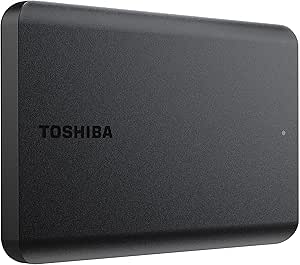
Toshiba Canvio Basics 2TB Portable External Hard Drive USB 3.0, Black
The Toshiba Canvio Basics suits buyers who want a straightforward 2TB drive for carrying files or keeping a local backup. Its plug-and-play setup and compact 2.5-inch body avoid extra software and bulky desktop hardware, while USB 3.0 also works with USB 2.0 devices. Compared with the WD Elements 4TB, it holds less, but its 2TB capacity may be easier to manage if you mainly store documents, photos, and a modest media library. The main catch is its Windows pre-format: Mac users may need to reformat it before use. Its 5400-rpm mechanism is also a traditional hard drive, so it is not the pick for speed-sensitive transfers or frequent work with very large files.
Pros:- Compact 2.5-inch design is easy to carry with a laptop
- Plug-and-play setup keeps basic file storage simple
- 2TB capacity provides room for documents, photos, and backups
- USB 3.0 connection is compatible with USB 2.0 devices
Cons:- Windows pre-format may require reformatting for Mac use
- 5400-rpm hard drive is slower than an external SSD
- Offers half the capacity of the WD Elements 4TB
Best for: Windows laptop owners who need a compact drive for routine backups, documents, and photos without installing backup software.
Not ideal for: Mac users who want a ready-to-use drive, or creators who regularly transfer large files and prioritize faster performance.
- Capacity:2 TB
- Interface:USB 3.0
- Form factor:2.5 inches
- Rotational speed:5400 rpm
- Data transfer rate:5 gigabits per second
- Compatibility:Mac, PC
- Color:Black
Our verdict“Choose the Canvio Basics for uncomplicated Windows backups in a portable 2TB drive, but look elsewhere if you need Mac-ready formatting, more space, or SSD-class speed.”
Seagate 2TB Portable Hard Drive USB 3.0
The Seagate 2TB Portable Hard Drive is a practical choice for someone who moves files between Windows and Mac systems and wants a no-software setup. It pairs USB 3.0 connectivity with a compact portable format, and the listed 7200-rpm speed and 120 MB/s read speed distinguish it on paper from the 5400-rpm Toshiba Canvio Basics. That makes Seagate the more appealing of those two for routine transfers, though neither is an SSD for demanding, speed-critical work. The 2TB ceiling is the main limitation: the WD Elements 4TB offers twice the room for large media libraries or longer backup histories. This Seagate also lacks included backup software, so buyers who want automated file protection will need to arrange that separately.
Pros:- Listed Windows and Mac compatibility supports use across both platforms
- Plug-and-play setup requires no additional software
- Compact portable design suits travel and laptop bags
- Listed 7200-rpm rotational speed and 120 MB/s read speed
Cons:- 2TB capacity is less than the WD Elements 4TB
- No included backup software for automated file copies
- USB 3.0 is needed to make the most of the listed transfer performance
Best for: People who share a portable backup drive between Windows and Mac computers and prefer a simple USB setup.
Not ideal for: Users with large video libraries or growing archives who need more than 2TB, or buyers seeking included backup software.
- Capacity:2 TB
- Interface:USB 3.0
- Rotational speed:7200 rpm
- Read speed:120 MB/s
- Data transfer rate:1 Gbps
- Compatibility:Windows, Mac
- Form factor:Portable
Our verdict“Pick this Seagate for straightforward 2TB storage shared between Windows and Mac, but choose a higher-capacity model if your backups are growing.”
WD 4TB Elements Portable External Hard Drive for Windows, USB 3.2 Gen 1/USB 3.0, Plug and Play
For buyers whose files are already outgrowing 2TB drives, the WD Elements 4TB puts capacity ahead of extras. Its compact 2.5-inch body makes that larger storage pool portable, and USB 3.2 Gen 1/USB 3.0 support suits everyday backups and transfers on compatible computers. Compared with the Toshiba Canvio Basics 2TB, it offers twice the stated capacity, which means fewer compromises for photo collections, video files, or keeping multiple backup sets on one drive. The tradeoff is a plain storage tool: WD lists no encryption or advanced security features, and the product is positioned for Windows even though the description also mentions PC and Mac use. Buyers wanting a smaller archive may find the Seagate 2TB easier to justify; those needing added protection should look at a My Passport option instead.
Pros:- 4TB capacity exceeds the 2TB Toshiba Canvio Basics and Seagate options
- Compact 2.5-inch form factor remains portable
- USB 3.2 Gen 1/USB 3.0 supports everyday transfers
- Two-year limited warranty is listed
Cons:- No listed encryption or advanced security features
- Product positioning emphasizes Windows, so Mac users should check formatting needs
- USB 2.0 is also referenced in the interface specifications and can be slower
Best for: Laptop and desktop owners who need portable room for large photo, video, or work-file backups and value capacity over bundled features.
Not ideal for: Travelers who only need a small file shuttle, or people who require built-in encryption and advanced security controls.
- Capacity:4 TB
- Interface:USB 2.0/3.0
- Connectivity:USB
- Form factor:2.5 inches
- Color:Black
- Warranty:2-year limited warranty
Our verdict“Choose the WD Elements 4TB when portable backup space matters more than security extras or a particularly small capacity.”
500 GB External Hard Drive, Portable USB 3.0 Slim HDD for Windows, Mac, PS4, Xbox One
This 500GB portable drive is the lineup’s small-capacity option for carrying a focused set of files rather than building a large backup archive. At 0.35 pounds and 2.5 inches, it is easy to slip into a bag, and its listed compatibility spans Windows, Mac, Linux, PS4, and Xbox One. That breadth gives it a different role from the WD Elements 4TB, which is a better fit for extensive backups but takes a capacity-first approach. The listed 133 MB/s read and 103 MB/s write speeds suit ordinary file transfers, while the 5400-rpm mechanism remains a hard drive rather than an SSD. Its biggest limitation is simply space: 500GB fills quickly with large media files, and Mac use requires formatting.
Pros:- Lightweight at a listed 0.35 pounds
- USB 3.0 interface and listed read/write speeds support everyday transfers
- Compatibility includes Windows, Mac, Linux, PS4, and Xbox One
- Includes a quick start guide and USB cable
Cons:- 500GB is far less capacity than the WD Elements 4TB
- Mac use requires formatting
- 5400-rpm HDD is not suited to speed-demanding tasks or running current-generation games directly
Best for: Travelers, students, or console owners who need a lightweight drive for a limited collection of files and are comfortable managing formatting.
Not ideal for: Anyone creating a full computer backup, storing a large game or video library, or expecting to run current-generation games directly from the drive.
- Capacity:500 GB
- Interface:USB 3.0
- Form factor:2.5 inches
- Read speed:133 MB/s
- Write speed:103 MB/s
- Weight:0.35 lbs
- Rotational speed:5400 rpm
- Compatibility:Windows, Mac, PS4, Xbox One, Linux
- Enclosure material:Plastic
Our verdict“Choose this drive as a lightweight shuttle for a modest file collection, not as the main backup for a large library.”

How We Picked
I ranked these portable hard drives by how well their stated features match common storage needs: backing up a computer, carrying a media library, moving large files, and working across devices. I compared capacity, advertised transfer speed where provided, connection type, protective features, and how clearly each listing describes compatibility. I also treated HDDs and SSDs as different tools: HDDs earn credit for larger stated capacities, while SSDs stand out for speed and, in one case, a stated ruggedness rating.
The order reflects the balance of usefulness and tradeoffs, not a claim that one format is right for everyone. Models with useful capacity and added security or versatility rank ahead of simpler choices when those features can matter to a broad group of buyers. High-capacity Elements drives remain strong picks for storage-heavy users, while the SanDisk SSDs rise for speed-sensitive or travel-focused tasks. Where listings share similar features, I distinguish them by capacity, protection, and stated device support; buyers should check the exact model and formatting requirements before purchase.
Factors to Consider When Choosing Portable Hard Drives
Choosing a portable drive is less about finding the biggest number and more about matching storage to your files, devices, and backup habits. I’d weigh these factors before deciding between a high-capacity HDD, a faster SSD, or a simpler entry-level option.
Choose Capacity Around Your Actual Library
Estimate the space used by files you plan to keep on the drive, then leave room for future growth and temporary copies. A 500GB or 1TB model can suit documents and a modest photo collection, but video libraries and full-computer backups can outgrow them quickly. Drives in the 4TB to 6TB range are better suited to larger archives, though unused capacity is not a benefit if it makes the drive harder to justify carrying. For backups, remember that a single portable drive is not a substitute for a second copy stored elsewhere. I’d favor extra headroom when the drive will hold years of files, rather than buying a capacity that is already nearly full.
Decide Whether HDD Capacity or SSD Speed Matters More
Portable HDDs are a practical fit for large archives and routine backups, while SSDs are more suitable when frequent transfers or work directly from the drive matter. The speed figures on product listings are advertised maximums, not a guarantee of real-world performance; the computer, cable, port, and workload all affect results. If you mostly store files and retrieve them occasionally, an HDD’s larger listed capacities may be the better match. If you move large video projects or need quick access while traveling, an SSD can save time and has no spinning disk. Avoid paying for speed you will rarely use, but do not choose an HDD for active editing solely because it offers more storage.
Check Device Compatibility Before You Buy
A drive’s connector and its formatting are separate compatibility questions. USB 3.0 or USB 3.2 describes the connection standard, but a Mac, Windows PC, or game console may still need a different file system or a reformat before use. Reformatting can erase existing data, so check the manufacturer’s instructions and back up anything on the drive first. Console support can depend on the console generation and whether the drive is being used for media, backups, or game storage. If you plan to move the drive between computers, confirm that each system can read and write the chosen format rather than relying only on the product title.
Treat Security and Backup as Separate Needs
Password protection can reduce casual access to stored files, but it does not protect against loss, physical damage, or a forgotten password. Check how the security feature is set up and whether it relies on software that works on all the computers you use. A portable drive can also be lost or damaged, so keep another copy of important files on a separate device or in a trusted backup service. Buyers handling sensitive work files should choose a protection approach they can maintain, including secure password storage and a recovery plan. Do not assume that a feature described as ransomware protection replaces a full backup strategy.
Match Durability to Where the Drive Will Go
A drive that stays on a desk faces different risks from one carried in a backpack or used on location. The SanDisk Extreme listing gives an IP65 water and dust-resistance rating, a specific advantage for exposure to dust or splashes, but that rating is not a promise that the drive can survive every accident. The standard HDD listings do not provide the same stated protection, so I’d use a case and handle them carefully during travel. Even a rugged drive can be damaged by drops, connector strain, or heat, and durability claims do not replace backups. If the drive will mostly sit beside a computer, prioritize capacity and workflow over rugged features you may not need.
Look Beyond the Storage Number to Everyday Usability
For a drive used daily, consider whether its cable and connector suit your devices, how easy it is to carry, and whether the setup fits your backup routine. A compact HDD may be simple to pack, but it still needs careful handling because it contains moving parts. SSDs avoid that mechanism and can be more convenient for frequent movement, though their listed capacity may be lower. Think about how you will label, organize, and periodically check the drive; a large capacity is less useful if files become difficult to find or the backup is never updated. Before relying on any model, run a small transfer and confirm that your computer recognizes it as expected.
Frequently Asked Questions
Should I choose a portable HDD or SSD for computer backups?
For scheduled backups and large file archives, a portable HDD can make sense when capacity matters more than transfer speed. An SSD is a stronger fit if you move the drive often, transfer large folders regularly, or work directly from stored files. Neither format should be your only copy of irreplaceable data, since both can be lost or fail. Think about how much data you need to store and how often you access it before choosing. If backups include sensitive files, also check the model’s security options and your system’s backup software.
Can I use one portable drive with both a Mac and a Windows PC?
Often, yes, but the drive may need a file system that both operating systems can read and write. Some products are listed as Windows-focused, while others mention Mac compatibility; those descriptions do not always mean the drive arrives ready for every workflow. Reformatting may be required, and it typically erases data already on the drive. Check the manufacturer’s setup guidance before moving files onto it, especially if you intend to share it with a console as well. For a mixed-device setup, test a small file transfer on each system before trusting the drive with your only copy.
Is 2TB enough for photos, videos, and backups?
It can be enough for a modest photo collection, documents, and selected video files, but the answer depends on file size and whether you are backing up an entire computer. High-resolution video and repeated full backups can consume space much faster than everyday documents. If your library is growing or you want to keep several backup versions, compare 2TB with the 4TB to 6TB options in this roundup. A smaller SSD can still be the better choice when speed and portability matter more than holding everything. Check the space currently used by your files and allow room for future additions.
Will a portable hard drive work with PlayStation or Xbox?
Some listings name PlayStation or Xbox support, but compatibility depends on the console model, intended use, and drive setup. A console may ask you to format the drive, which can erase files already stored on it, and a drive used for games may have different requirements from one used for media. Confirm the console maker’s current storage rules for your system before connecting a drive. Do not assume that a product title naming a console guarantees every feature will work on every generation. If you also plan to use the drive with a computer, check whether you can manage the formatting without disrupting that workflow.
Is a rugged SSD worth choosing over a higher-capacity HDD?
It can be worthwhile if you carry the drive outdoors, work around dust or splashes, or need faster access to active projects. In this lineup, the SanDisk 2TB Extreme SSD lists up to 1050MB/s and an IP65 rating, while some HDD choices offer much more storage capacity. The SSD’s advantages matter less if the drive stays at home and mainly holds files you rarely open. Also, an IP rating describes specific resistance conditions rather than protection from every drop or accident. Choose the SSD for mobile work and speed-sensitive tasks; choose a larger HDD when keeping more data is the main goal.
Conclusion
For the best all-around balance, I’d choose the WD 5TB My Passport, especially if its listed security features suit your workflow. The best value for straightforward bulk storage is a WD Elements model sized to your library, with the 6TB version favoring buyers who need the most space in this group. For a premium, speed-focused portable option, the SanDisk 2TB Extreme Portable SSD is the clearest fit; its speed and stated IP65 resistance come with less capacity than the largest HDDs. Beginners who want a simple starting point can look at the WD 2TB Elements or Toshiba Canvio Basics 2TB, while checking setup and compatibility before use. For console owners, the Seagate 1TB listing explicitly names PlayStation and Xbox; for work in dusty or splash-prone settings, choose the rugged SanDisk SSD. Match capacity to your library, then let speed, security, and travel conditions settle the choice.
Halloween Picks
halloween
As an affiliate, we earn on qualifying purchases.